
Instructions For Use HAPIS-NTS Module
This user manual (e-IFU) is valid for HAPIS-NTS Module version 11.10 and higher. To view this page in Dutch click here.
Effective date: November 17, 2025
| UDI |  |
(01)08720892344403(8012)11.10 |
| Version |  |
11.10 |
| Notified body | NB 2797 | |
| CE-marking |  |
Warning: this product does not yet have a CE marking |
| HAPIS support e-mail | supporthap@healthconnected.nl | |
| Contactgegevens fabrikant |  |
B.V. HealthConnected, Helderseweg 54-F, 1817 BB Alkmaar, Nederland, Website: healthconnected.nl |
You can request a paper user manual (for current or outdated versions) by contacting us via supporthap@healthconnected.nl
The HAPIS-NTS Module does not store any data. If data deletion from the HAPIS platform is required, please consult the information in the Data Processing Agreement or contact the Data Protection Officer (DPO) via fg@healthconnected.nl
- The HAPIS-NTS Module is indicated for:
- Primary care patients for which a triage specialist needs to determine if the patient is in need of care provided by a general practitioner (non-life threatening situations and critical conditions) outside of normal opening hours.
- Usage by Dutch general practice centers.
- The HAPIS-NTS Module is contra-indicated for:
- Patients with questions regarding non-medical conditions.
- Usage outside Dutch general practice centers.
- The HAPIS-NTS Module may only be used by certified triage specialists.
- Triage specialists must have completed HealthConnected training. This can be done in person during implementation or afterward via the online training facility.
- Triage specialists should not rely solely on the HAPIS-NTS Module for prioritizing care; i.e., when the software is offline or otherwise unavailable, patients should receive the same professional care. Therefore, triage specialists should always have a paper copy of the triage standard (clinical practice guideline) on hand. They are responsible for this themselves.
Report serious incidents to the manufacturer and the competent authority.
Intended purpose
The HAPIS-NTS Module is intended for triage in primary care. It is intended for primary care patients for which a triage specialist needs to determine the urgency and follow-up action. The HAPIS-NTS Module is intended to be used by certified triage specialists at general practice centers to enable them to follow and apply the Netherlands Triage Standard (NTS) protocol which is a structured way for patient triage, providing consistent and guideline-based decision-making. This is done by determining the urgency and severity of the medical condition. The HAPIS-NTS Module provides a graphical user interface (GUI) that visualizes and interacts with the NTS dataset and its underlying triage rules.
Clinical benefit
The NTS triage protocol has been digitized in the HAPIS-NTS Module. This NTS triage protocol is clinically validated and designed to assist healthcare professionals in determining a patient’s care needs. With the HAPIS-NTS Module, every triage follows the same structured flow based on the NTS triage protocol decision rules, ensuring consistent and guideline-oriented decision-making. This contributes positively to patient management by enabling more effective direction and control of patient flows.
Brief description
When a primary care patient in the Netherlands experiences complaints outside the regular opening hours of their own general practitioner, they contact the general practice center. The employees at the general practice center register this contact in the general practice center information system with the aim of completing the Electronic Health Record (EHR).
The HAPIS-NTS Module is part of the general practice center information system and follows the proven Dutch Triage Standard (NTS). The HAPIS platform acts as a host environment and user interface container for the HAPIS-NTS Module. While the user interface of the module is integrated into the platform, the HAPIS-NTS Module remains logically and functionally separated. The HAPIS platform does not perform any clinical decision-making and does not influence the triage rules of the HAPIS-NTS Module. The HAPIS-NTS Module provides the process to determine the urgency plus the follow-up action. The follow-up action can be, for example, a consultation with an on-call general practitioner or a referral to the emergency room.
The triage specialist at the general practice center starts by checking whether the patient is out of life threatening danger (primary care). If the patient is in life threatening danger, the patient is handed over to the ambulance (secondary care). If the patient is out of life threatening danger then the triage process is followed.
The urgency and follow-up action are determined by choosing an initial complaint, asking triage questions and registering the answer. Based on the primary care patient’s condition, the triage specialist can deviate from the advice given by the HAPIS-NTS Module; the urgency can be scaled up or down and the follow-up action can be adjusted.
Based on the outcome of the HAPIS-NTS Module, the primary care patient will be consulted by an on-call general practitioner, is referred to another healthcare professional, or receives self-care advice.
Legal requirements
- The customer must have implemented an account policy to ensure that only authorized individuals have access to the HAPIS-NTS Module, to prevent data breaches.
- The customer must always log out when they stop using the HAPIS-NTS Module, to prevent data breaches.
- The HAPIS-NTS Module must be used in a secure and protected environment that only triage specialists and general practitioners have access to, to prevent data breaches. This excludes the patient being treated, who may only view their own medical records.
- The customer must always lock the screen when leaving the room while the patient is still in the room, to prevent data breaches.
Requirements for the customer’s ICT environment
- The customer must use up-to-date hardware and operating systems: equipment capable of running the application at a high performance level. The operating system (Microsoft, Apple, Linux) is irrelevant and the type must be one of the following: PC, laptop, tablet; all hardware must be recent with sufficient memory and processing power (maximum 5 years old, unless otherwise stated in writing). Please note: keeping the hardware and operating system up-to-date (including security updates and patches) is the responsibility of the customer.
- The customer must have anti-virus/malware software installed on the devices used to access the HAPIS-NTS Module. Please note: keeping the anti-virus/malware software up-to-date (including security updates and patches) is the responsibility of the customer.
- The customer must have disk encryption enabled on the devices used to access the HAPIS-NTS Module.
- The HAPIS-NTS Module must be used with a minimum screen resolution of 1920 x 1200.
- The HAPIS-NTS Module must be used with an up-to-date browser and one of the following: Microsoft Edge, Google Chrome, Apple Safari, Mozilla Firefox. Please note: keeping the browser up-to-date (including security updates and patches) is the responsibility of the customer.
- The customer must allow browser pop-ups for *.healthconnected.nl on the devices used to access the HAPIS-NTS Module.
- The HAPIS-NTS Module must be used with a stable network and a stable internet connection with a minimum speed of 50Mbps (down) / 15Mbps (up). “Stable” here means low and, above all, continuous and regular low network latency (maximum 35 ms).
- Traffic from devices accessing the HAPIS-NTS Module must originate from an IP address assigned to the country in which the device is located. HealthConnected uses geoblocking, which means that traffic from certain countries that pose a threat to the application’s security is blocked.
- The customer’s network must allow web socket connections in the browser, firewall, or proxy environment. The whitelist must be *.healthconnected.nl. This is necessary for real-time data traffic (so that, for example, all workstations see the same thing simultaneously).
How to start the HAPIS-NTS Module
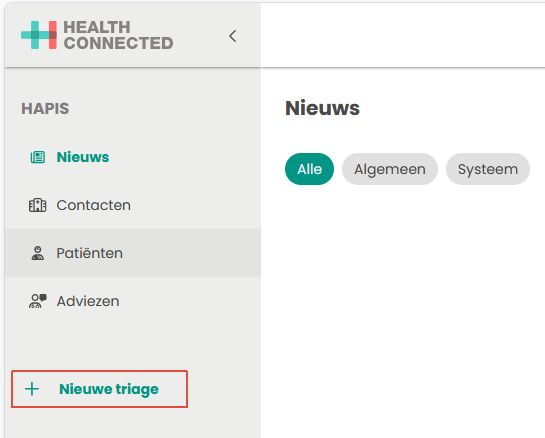
To start the HAPIS-NTS Module, you must first be logged in to the HAPIS platform. Then, click on the ‘+ New triage’ button in the left menu.
You can find more information about the use of the HAPIS-NTS Module in the physicians handbook of the HAPIS platform.
Reference to the physicians handbook
To access the physicians handbook, you must first be logged in to the HAPIS platform. Then click on the – icon from in the top bar.

Revision history
| Version | Change |
| 11:10 | Initial delivery of the User Manual (eIFU) |